Creature Design Anatomy: Hybrid Reference, Believable Biology, and Functional Monsters
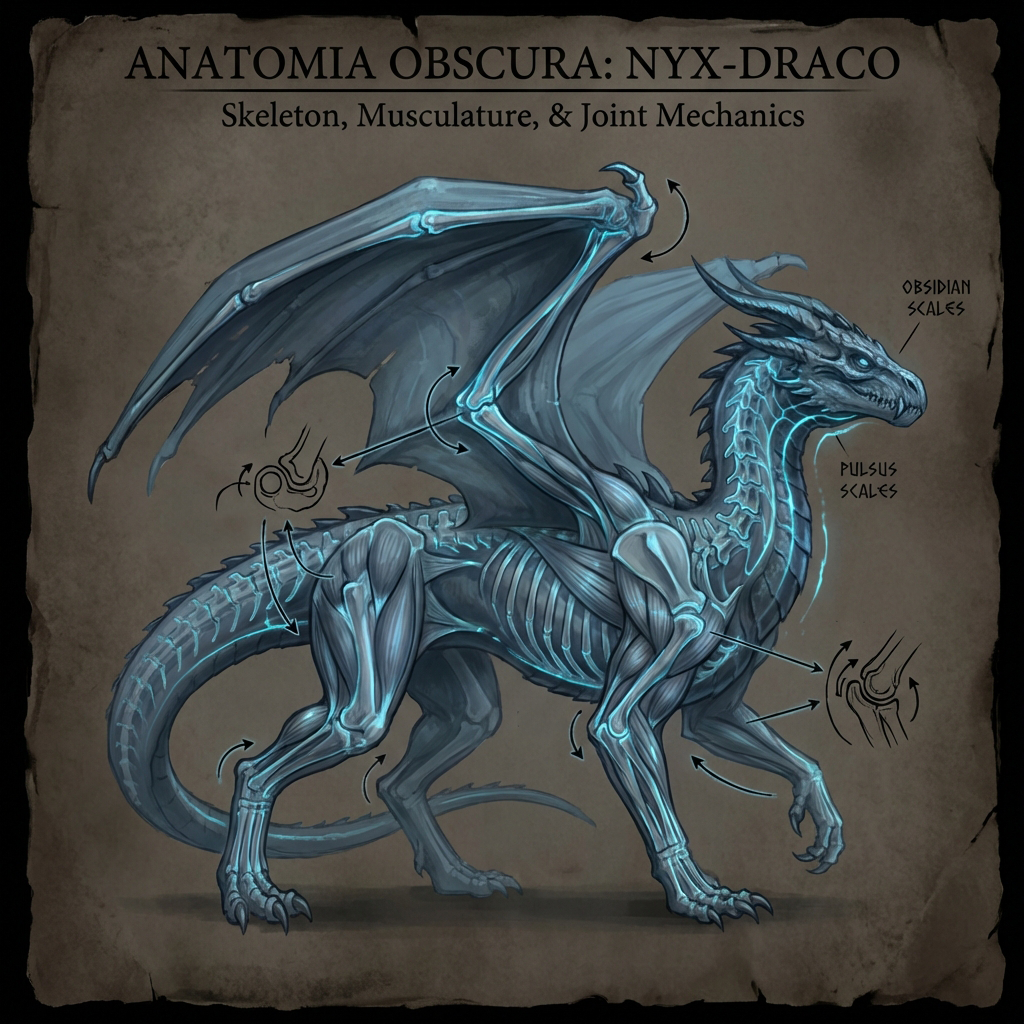
The difference between “random monster” and “believable creature” is not realism—it’s functional logic. Viewers may not know anatomy terms, but they can feel when joints don’t bend or weight doesn’t make sense.
This guide teaches a production-friendly anatomy workflow:
- build a hybrid reference stack (primary + secondary + hook)
- plan the skeleton to ensure mobility
- design muscles in functional groups (not every muscle)
- add survival logic: feeding, defense, senses
- optional Blender blockout for perspective and posing
1. Build a Hybrid Reference Stack (Stop Random Googling)
Professionals don’t search “cool monster.” They search for function.
The 70/20/10 hybrid method
- 70% Primary base: locomotion identity (wolf, gorilla, shark, owl)
- 20% Secondary influence: a feature twist (bat ears, mantis arms, camel feet)
- 10% Hook: one iconic detail (angler lure, frill, bioluminescence, asymmetry)
Rule: too many influences = incoherent design.
Reference categories you actually need
- skeleton/joint diagrams (for bending)
- muscle mass examples (for power zones)
- surface material (skin/scales/fur)
- behavior footage (movement reads)
Pro tip: build a PureRef board with labeled sections: Skeleton / Muscles / Skin / Movement / Mood.
2. The Bone Pass: Skeleton First, Always
You don’t need a perfect skeleton drawing—just structural anchors.
The 5 skeleton anchors
- Spine curve (line of action)
- Rib cage (big volume)
- Pelvis (second big volume)
- Shoulder/hip joints (range of motion)
- Hands/feet (contact with world)
Quick skeleton overlay workflow
- Reduce silhouette opacity to 30–50%.
- On a new layer, draw simple bones:
- a spine line
- rib cage egg
- pelvis wedge
- limb sticks with joint circles
- Check bend direction:
- elbows bend opposite knees
- wrists/ankles angle toward ground contact
If the skeleton doesn’t work, the creature can’t move.
3. Joint Logic (Believability Shortcut)
Common creature joint mistakes
- shoulders placed too low (kills arm swing)
- hips too small (kills power and weight)
- knees bending the wrong way (unintended “alien” read)
Mobility rule
Ask: Can this creature climb, sprint, or leap without breaking itself?
Pro tip: exaggerate joints slightly—concept art needs readable mechanics.
4. Muscle Grouping (Design Power Zones)
Don’t render every muscle. Group by function.
Power zone guide
- Chest/shoulders: climbing, grappling, striking
- Thigh/glutes: sprinting, jumping, charging
- Neck/jaw: biting, carrying prey
- Forearms/hands: gripping, digging, tearing
How to make muscle believable
- put mass where the action happens
- keep non-essential areas slimmer
- avoid evenly distributed “bodybuilder” muscles everywhere
5. Survival Design: Feeding, Defense, Senses
A creature feels real when its design answers survival questions.
Feeding
- scavenger vs predator vs grazer
- mouth type: tearing jaws, beak, suction, proboscis
Defense
- armor plates (impact)
- spines (deterrent)
- toxins (warning colors)
- camouflage (pattern logic)
Senses
- wide forward eyes (predator)
- side eyes (prey)
- antennae (low light/alien)
- heat pits (hunter)
Design rule: every cool detail should justify one survival function.
6. Tail Design (The Overlooked Super Tool)
Tails can:
- counterbalance weight
- store fat
- act as weapon
- act as rudder in water/air
Pro tip: decide tail role early—tail changes silhouette and movement.
7. Blender-Assisted Creature Blockout (Optional, High Impact)
Use Blender when perspective/pose is tricky.
Blockout workflow (concept-friendly)
- Start with two big primitives:
- rib cage sphere/egg
- pelvis sphere/box
- Connect with a cylinder spine.
- Add limb cylinders.
- Use Mirror modifier if symmetrical.
- Rough pose by rotating limbs (no rig required).
- Screenshot from camera view and paint over.
Goal: solve perspective and volume; keep it rough.
8. Common “Believability” Fixes
- If it looks weightless: enlarge feet, lower center of gravity, add contact shadow.
- If it looks stiff: exaggerate spine curve, open limb angles.
- If it looks random: remove details that don’t serve function.
Exercises
- Pick a role: “cave climber predator.”
- Choose primary + secondary + hook.
- Do 10 silhouettes, then one skeleton overlay.
- Add 3 survival details that make sense.
FAQ
Do I have to be realistic? No. Believable ≠ realistic. It just needs consistent internal logic.
How do I make it ‘more alien’? Change joint count, symmetry, sensory organs—but keep locomotion readable.
Next and Previous
- Previous: Creature Design for Concept Art: Silhouette, Shape Language, and Readable Monsters
- Next: Creature Rendering for Concept Art: Fur, Scales, Wet Skin, and Material Hierarchy
Related tutorials
- Painting Skin for Concept Art: SSS, Facial Color Zones, and Realistic Specular Control
- Composition & Mood: Directing the Eye
- Color Scripting for Concept Art: Gamut Masks, Palette Control, and Emotional Storytelling
- Set Dressing for Concept Art: Environmental Storytelling, Clutter Logic, and Lived‑In Detail