Production Sketching Thumbnails: The “Idea Vomit” Workflow for Fast Concept Design
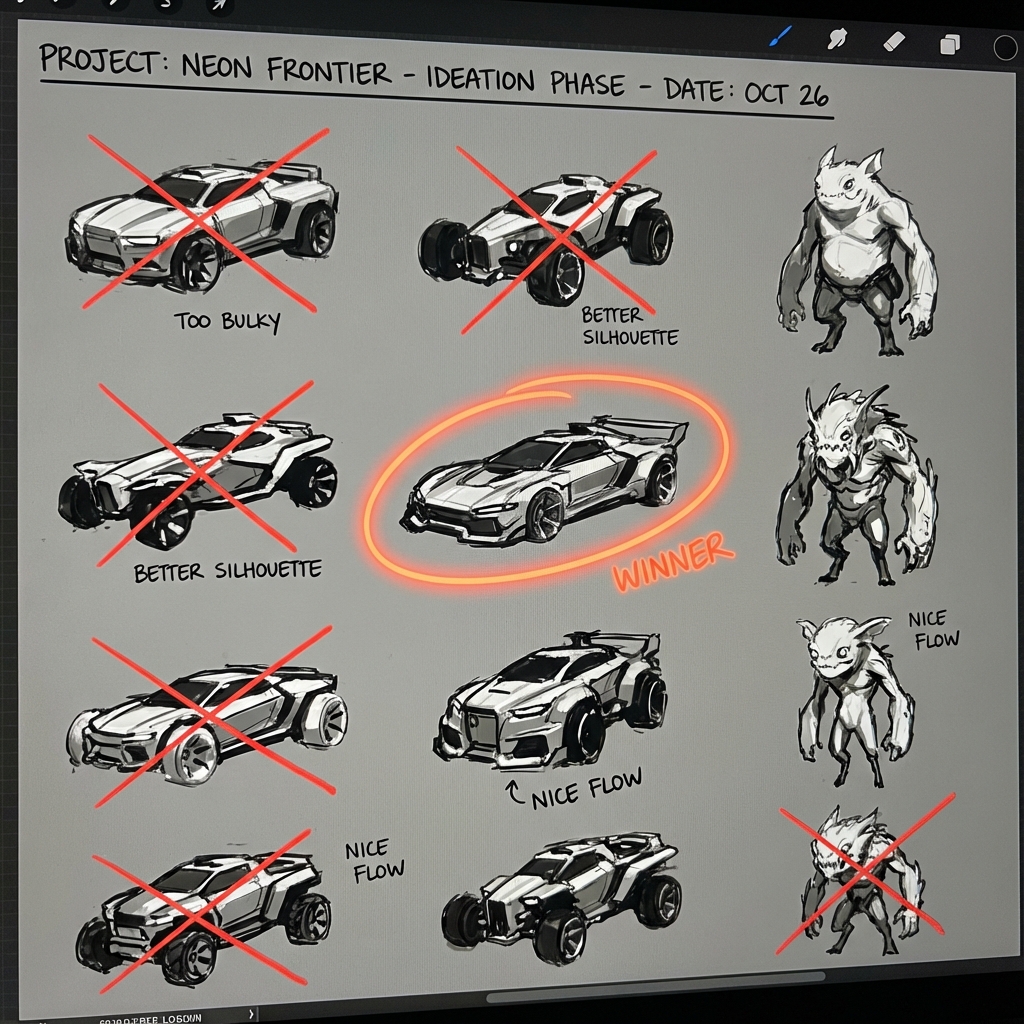
In the age of 3D, many students skip sketching. This is a mistake. Sketching is the fastest way to think on paper. A production thumbnail is not a painting—it’s an idea test.
This guide is a high-demand workflow: how professionals generate large volumes of ideas quickly, select the best, and turn them into concepts ready for 3D blockout or paintover.
1. The 10% Rule: Idea Mining (Not Idea Worship)
Your first idea is often generic. Your best idea usually shows up after you burn through the obvious options.
The method
- Work small (tiny canvas or zoomed out)
- Make 20+ variations
- No detail—only big shapes and gesture
The mindset
- Expect 90% to be bad.
- You’re mining for the 10% with spark.
2. The 3 Thumbnail Passes Professionals Use
Instead of trying to “finish” thumbnails, do focused passes.
Pass A: Silhouette thumbnails (shape)
- Use Lasso Fill or thick brush.
- Focus on negative space and overall read.
Pass B: Value thumbnails (readability)
- 2–3 values only.
- Place focal contrast intentionally.
Pass C: Story thumbnails (purpose)
- Add one story element:
- a tool, damage, sign, or gesture that implies narrative
Result: you get clarity without wasting time.
3. Orthographic Sketching (Blueprint Thinking)
Perspective hides design flaws. Orthos reveal them.
Use orthos when
- designing props, vehicles, armor, architecture
Quick blueprint workflow
- Side view first (profile carries character)
- Add projection lines for top/front
- Label moving parts and materials
Bonus: These become Blender image planes later.
4. Draw Through the Form (3D Brain Training)
When drawing in perspective, sketch what you can’t see.
- Back edges lightly
- Cross-contour lines for cylinders
- Centerlines for symmetry
This prevents “cardboard cutout” designs and makes your transition to 3D far smoother.
5. The Hybrid Thumbnail Cheat (2D Speed + 3D Accuracy)
If perspective slows you down, cheat like a pro.
- Spend 5–10 minutes in Blender with cubes/cylinders.
- Screenshot.
- Drop into Photoshop, lower opacity.
- Sketch design details on top.
You keep creative looseness while guaranteeing perspective correctness.
6. Picking Winners: The Thumbnail Critique Checklist
Circle winners using criteria:
- Readability: clear silhouette at tiny size
- Uniqueness: not a cliché shape
- Function: believable parts/logic
- Story: hints at world and role
- Big/Medium/Small: strong hierarchy
Pick 3 winners, refine those—don’t refine the whole sheet.
Exercises
- 20 silhouettes in 10 minutes.
- Pick 3, do value passes.
- Pick 1, do a 10-minute hybrid sketch over a cube blockout.
Next and Previous
- Previous: Render Recovery in Photoshop: Fix Lighting, Pose, Materials, and Composition Without Re-Rendering
- Next: Composition & Mood: Directing the Eye